Saturday, January 26, 2008
Monday, January 21, 2008
Visual Studio Task List feature - I regret for not knowing this earlier
Do you use Visual studio's Task List? Atleast I was't using it so far and I regret for not knowing this earlier. 
How it works
It works like this, you might want to do something at code at later point in time, just add a comment in this syntax
//TODO: Add exception handling here
or you are doing code review and felt a message should have been logged here just add a comment like this
//LOG: recursive function, log depth of stack
or you might have felt a method has grown too big, it must be refactored, just add a comment where ever you felt like
//REFACTOR: break this part as a function
How to access
And visual studio has a window to search for all these comments and present them in a list.
To show task list select from View -> Task List
By default it shows user task, select for comments from combobox.
How to customize
You can set more tokens from Tools -> Options Check in image here. TODO, HACK, UNDONE and UnresolvedMergeConflict are default tokens in visual studio. I added LOG and REFACTOR.
Check how a
TODO: Clean up and Log Something in code is shown with. And it is a clickable target
Also you can sort all log messages or TODO's to attend once.
Also you can define user defined tasks too.
For that select User tasks option in Task List and add your taks.
I felt the option very handy and felt like sharing it.
Unit Testing for Native Code
As I am spending most of time in CLR sandbox these days, I couldn't realise that NUnit can't work for native code. But that is a bit disappointing, having spent those many years developing C++ code, I couldn't accept flag go down. YES there is a Unit testing framework available for native C++ too. It is called WinUnit and MSDN Febraury 2008 article Simplified Unit Testing for Native C++ Applications describes the details.
Salient features are
a) Its built as a regular C++ dll
b) You can run it from Command Line by passing dll name as argument to WinUnit.exe
c) You can integrate with Visual Studio Build process, so whenever you build the project Unit Tests are performed
Compared to NUnit:
a) It lacks UI
b) Lacks report generation features
Friday, January 04, 2008
xcerion XML internet OS/3

Today I got my beta account for xcerion. First impression is "it is awsome", but doesn't work in firefox.
It works only with IE 6 or 7 on windows. Its an xml based web operating system. Applications are developed using Model View Controller framework.
Though it is not from big giants like Microsoft and Google, it paved a way towards it. It may not be adapted in low bandwidth environments, though there is an offline feature.
Tuesday, January 01, 2008
Wednesday, November 28, 2007
Midlets using MotoDev Studio
MotoDev Studio is a new IDE platform to develop J2ME applications for Motorola phones.
I just did a basic test using this.
Prerequiresites:
- Install latest JDK SE
- Install MotoDevStudio
Build Steps:
- Launch MOTODEV Studio for Java(TM) ME v1.0
- Create a new project
- Select Phone type
- Create a package under src folder. (not necessary, but a good practice. else default package will be selected)
- Create class
- Add code (simple hello world using LCDUI)
package MyPackage;
import javax.microedition.lcdui.*;
import javax.microedition.midlet.*;
public class HelloWorld extends MIDlet
{
private Form mainScreen;private Display myDisplay;
public HelloWorld()
{
myDisplay = Display.getDisplay(this);mainScreen = new Form("Hello World");
StringItem strItem = new StringItem("Hello","This is a J2ME MIDlet.");
mainScreen.append(strItem);
}
/**
* Start the MIDlet
*/
public void startApp() throws MIDletStateChangeException
{
myDisplay.setCurrent(mainScreen);
}/**
* Pause the MIDlet
*/
public void pauseApp()
{}
/**
* Called by the framework before the application is unloaded
*/
public void destroyApp(boolean unconditional)
{}
} - Edit Jad file MyMidlet.Jad; Goto Midlets tab (below); Add Midlets e:g MidletName,icon,Package.Class
- Build project, default setting is autobuild
- Create Package;Rightclick on MyMidlet Project (root element), From pulldown menu click J2ME and click on select CretePackage
- If everything goes well you should have MyMidlet.jar and MyMidlet.Jad files in ~:\Documents and Settings\user\workspace\MyMidlet\deployed
- Use MidletManager or your favourite tool to install this midlet
- Restart phone and test midlet
Note: This is without signing
Monday, November 26, 2007
VIM ftp editing
VIM supports easy editing of remote files.
Just Open ftp://domain.tld/path/to/file
It prompts for username and password!!!
Just Open ftp://domain.tld/path/to/file
It prompts for username and password!!!
Friday, October 26, 2007
Dave Winer on SOAP, REST and XML-RPC.
A good link http://www.kbcafe.com/rss/?guid=20060704042846
Note: Reproduced from site
SOAP Request
Note: Reproduced from site
SOAP Request
GET /stock HTTP/1.1
Host: www.kbcafe.com


<?xml version="1.0"?>
<soap:Envelope xmlns:soap="http://www.w3.org/2001/12/soap-envelope"
 xmlns:m="http://www.kbcafe.com/stock">
 <soap:Header>
   <m:DeveloperKey>1234</t>
 </soap:Header>
 <soap:Body>

    <m:GetStockPrice>
     <m:StockName>HUMC</m:StockName>
    </m:GetStockPrice>
 </soap:Body>
</soap:Envelope>
The SOAP request tends to be overly verbose, but generally (not always) easy to understand. The SOAP envelope wraps an optional Header and the Body. The Body contains the actual XML request object. The Header contains information not required to service the request, but that help in some other way. A common use of the SOAP Header is the attachment of user credentials to the request. The beauty of SOAP is that it's not bound to the HTTP transport, although HTTP is by far the most commonly used transport for SOAP messages.
SOAP Response
HTTP/1.1 200 OK

<?xml version="1.0"?>
<soap:Envelope xmlns:soap="http://www.w3.org/2001/12/soap-envelope"
 xmlns:m="http://www.kbcafe.com/stock">
 <soap:Body>
   <m:GetStockPriceResponse>
     <m:Price>27.66</m:Price>

   </m:GetStockPriceResponse>
 </soap:Body>
</soap:Envelope>
The SOAP response, also slightly overly verbose, but easy to understand. Now, imagine getting this response and you want the m:Price element text. How would you formulate the XPath to acquire this bit of information? Very simple ("//m:Price/text()").
REST Request
GET /stock?StockName=HUMC HTTP/1.1
Host: www.kbcafe.com
The beauty of REST is that GET requests do not require a request package. In this case, the parameter data is simply passed as an HTTP request parameter. Of course, this simplicity comes with a price. You are now bound to the HTTP protocol. Although the argument has been made that the principles of REST are not bound to HTTP, nobody has ever documented that approach.
It's important I explain here that REST is primarily used to service GET requests. By GET, I mean REST requests using the HTTP GET verb. REST uses three other HTTP verbs POST, PUT and DELETE. GET is used to retrieve data, POST to create, PUT to edit and DELETE to ... umh... delete. The HTTP verb is another element that binds the REST protocol to HTTP.
REST Response
HTTP/1.1 200 OK


<?xml version="1.0"?>
<m:Price xmlns:m="http://www.kbcafe.com/stock">27.66</m:Price>
The REST response is often very similar to the contents of the SOAP request body. And it's very easy to express an XPath and retrieve the data ("//m:Price/text()"). Note the REST response is actually simpler than the SOAP Body. This is by convention. SOAP transactions typically contain an element named with the method name and the strings Request and Response appended. This is actually unnecessary, but does have one advantage. REST request typically embed the method name within the request URL, which again binds the protocol to HTTP, whereas embedding the method name within the package allows SOAP to exist over any protocol.
XML-RPC Request
POST /stock HTTP/1.1
Host: www.kbcafe.com

<?xml version="1.0"?>
<methodCall>
  <methodName>stock.GetStockPrice</methodName>

  <params>
     <param>
        <value><string>HUMC</string></value>
     </param>
  </params>

</methodCall>
The XML-RPC request is the most verbose of all the protocols. This verbosity is what makes XML-RPC both difficult to use and lacking in inter-op. For example, the <string> element is optional, so the <value> element could have been expressed as <value>HUMC</value>. Several MetaWeblogAPI (the most common implementation of XML-RPC) providers assume the <string> element is present, while others assume it's not present. Whichever way you code it, at least one MetaWeblogAPI provider will fail. This leads to a lot of frustration for developers trying to write XML-RPC applications. You often have to code the request differently to compensate for different server implementations.
XML-RPC Response
HTTP/1.1 200 OK

<?xml version="1.0"?>
<methodCall>
  <methodName>stock.GetStockPrice</methodName>
  <params>
     <param>

        <value><double>27.66</double></value>
     </param>
  </params>
</methodCall>
Again, the XML-RPC response is the most verbose and again it contains a gross limitation. What's the XPath for retrieving the data? If you said ("//double/text()"), then we might have a problem down the road. Imagine the provider augments his response with new elements that includes the stocks 365-day high and 365-day low. The XPath would fail. Neither SOAP or REST have this problem, because the elements are named semantically.
Thursday, September 27, 2007
Happy Birthday to Google
Today is 9th birthday for Google.
WISH YOU MANY MANY HAPPY RETURNS OF THE DAY GOOGLE.
Saturday, August 11, 2007
Regular Expressions - Part3
In previous post Regular Expressions - Part2, we discussed about regular expression engines and concept of backtracking. In this post we will discuss about the basis constructs of regular expressions , how to use them t o match simple words and lines.
Meta Characters
Meta characters are a sub-set of ASCII character set which take part in building a regular expression. e.g. +,$,^ etc.. Thus these characters instruct regex engines to perform specific operations. If we want to instruct regex engine to deal with thm as normal characters instead of meta characters we need to escape them with backward slash '\'.e.g regex "firstname\.lastname" instructs the engine to ignore special meaning of '.' and to consider as a '.' character.
Following list gives overview of mostly used meta characters.
. Dot - any character in a line
In normal search we use ? to specify a single wildcard character and * to specify sequence characters till next character. e.g. to search a file we use IAdb*.dll But in regex * is used for repetition. Also note that in a line phrase. This mean that the behavior of ‘.’ can be altered using mode settings like SingleLine or MultiLine mode to notify regex engine whether to match a newline (\n or \r\n) with a ‘.’ or to stop at new line. e.g:
Search String:
using System;
using System.IO;
using System.Text;
RegEx: “System.*”
Explanation: In MultiLine mode this matches all references with System and its decedents till end of line.
Matches in non-Single Line mode:
a)System;
b)System.IO;
c)System.Text;
Matches in Single Line mode:
a)System;System.IO;System.Text;
Note that semicolon is also matched in each line
\ - back slash
It is already mentioned that these are used to instruct regex engine to consider them as
normal characters. And when used with a number like \1 or \2, this specifies a back reference number. Back references will be covered seperately.
[ ] - opening and closing square bracket
Any group of characters to be matched are specified within these brackets. Examples are mentioned below.
( ) - round brackets
These are used to ho sub-expressions or back references. Back references will be covered later. Sub-expressions are similar to programming language sub expressions.
{ } curly brackets
These are used with iterators. We have seen this in Part 2 for five digit length. Its format is like{x,y}. where specifier is anything that need to repeated. Here x is
mandatory and can contain values from 0 to value of y. And y is optional to specify. and has to be any integer.
* Iterator to iterate for zero or more times. (0 or more times)
? Iterator to iterate for zero or one time only. (0 or 1 times)
+ Iterator to iterate for at least once or more times. (1 ore more times)
\w alphanumeric character including underscore
\W non-alphanumeric
\d numeric character
\D non-numeric
\s any white space; include, , and
Meta Characters
Meta characters are a sub-set of ASCII character set which take part in building a regular expression. e.g. +,$,^ etc.. Thus these characters instruct regex engines to perform specific operations. If we want to instruct regex engine to deal with thm as normal characters instead of meta characters we need to escape them with backward slash '\'.e.g regex "firstname\.lastname" instructs the engine to ignore special meaning of '.' and to consider as a '.' character.
Following list gives overview of mostly used meta characters.
. Dot - any character in a line
In normal search we use ? to specify a single wildcard character and * to specify sequence characters till next character. e.g. to search a file we use IAdb*.dll But in regex * is used for repetition. Also note that in a line phrase. This mean that the behavior of ‘.’ can be altered using mode settings like SingleLine or MultiLine mode to notify regex engine whether to match a newline (\n or \r\n) with a ‘.’ or to stop at new line. e.g:
Search String:
using System;
using System.IO;
using System.Text;
RegEx: “System.*”
Explanation: In MultiLine mode this matches all references with System and its decedents till end of line.
Matches in non-Single Line mode:
a)System;
b)System.IO;
c)System.Text;
Matches in Single Line mode:
a)System;System.IO;System.Text;
Note that semicolon is also matched in each line
\ - back slash
It is already mentioned that these are used to instruct regex engine to consider them as
normal characters. And when used with a number like \1 or \2, this specifies a back reference number. Back references will be covered seperately.
[ ] - opening and closing square bracket
Any group of characters to be matched are specified within these brackets. Examples are mentioned below.
( ) - round brackets
These are used to ho sub-expressions or back references. Back references will be covered later. Sub-expressions are similar to programming language sub expressions.
{ } curly brackets
These are used with iterators. We have seen this in Part 2 for five digit length. Its format is like
mandatory and can contain values from 0 to value of y. And y is optional to specify. and has to be any integer.
* Iterator to iterate for zero or more times. (0 or more times)
? Iterator to iterate for zero or one time only. (0 or 1 times)
+ Iterator to iterate for at least once or more times. (1 ore more times)
\w alphanumeric character including underscore
\W non-alphanumeric
\d numeric character
\D non-numeric
\s any white space; include
Thursday, August 09, 2007
Regular Expressions - Part2
In my last post Regular Expressions - Part1, I gave some introduction about regular expressions and presented code to build a tool that can be used to test basic regex constructs.
In this part I will discuss about how regular expression engines work. Before going there I just want to make a point about non-printable characters. Just have a look at ASCII chart once. Look for control characters, printable characters, non- printable characters etc..
In simple terms, one can categorize them based on search time. Say that with text directed engines, search time depends on length of the search string. And with regex directed engines search time depends on length of the regex.
In this part I will discuss about how regular expression engines work. Before going there I just want to make a point about non-printable characters. Just have a look at ASCII chart once. Look for control characters, printable characters, non- printable characters etc..
Brief on Regex Engines
Regex engine is a library that can process regular expressions for search and replace operations. These engines operate on each character and thus composed of complex algorithms.
Editors supporting regex provide front end for this library. You can use this library with programming languages. As such there is a native support for regular expressions in some languages like Pearl, Ruby etc.. Microsoft got regex support from vbscript days. vbscript supports regular expressions with RegExp object. And look for class library reference of System.Text.RegularExpressions namespace for regex support in .Net. We used this in last example.
As these engines operate on each character and try to match with patterns; performance plays a major role. There are two kinds of engines to chose from. One is called Text Directed Engine while other one is Regex Directed. I will describe them in brief.
Of course no programming language offers a choice to select a particular regex engine. Its matter of what it supports.
In case of editors there is a simple way to test what kind of engine it is. Just apply regular expression "regex | regex not" on string regex not. If search result is regex then it is regex engine otherwise if the search result is regex not then it is text directed engine. There are couple of points to note here.
- Expression you applied tries to match string "regex" or "regex not". '|' is a meta character in regular expressions character set. You can think this as an instruction for 'or' operation.
- When you apply this regex on string regex not it got option to chose just the first word or both words. Regex engines characterizes eagerness, mean they are eager to return results to be quick and faster. Where as text based engines look for longest possible match. Thus former returns regexregex not.
In simple terms, one can categorize them based on search time. Say that with text directed engines, search time depends on length of the search string. And with regex directed engines search time depends on length of the regex.
Back Tracking
Another important concept is back tracking. As the name suggests back tracking is about tracking how we traversed while coming back. Did I confuse you? That is not intentional; let us see this with an example.

Suppose you are looking at financial report. And you are interested in values between 10K to 99K.
Now let us take figure "INR75063.37" . You know that it starts with INR and it is in the format of INR(x).(y) where x >= 0 and y = (00 to 99).
So you are looking for five digits before paise separator '.' This can be expressed as
"\bINR[0-9]{5}\.[0-9]{2}\b"
Let us apply this regular expression on following text
The amounts are Auto INR30.00 Onward Flight INR450454.34
Taxi INR435.65 and Return Flight INR34543.43 etc.
Observe result with five digits INR34543.43 the figure in desired range.
Now let us walk through what happened here.
First with regular expression - \bINR[0-9]{5}\.[0-9]{2}\b. Outer \b at the beginning and at the end specify word boundary.
Obviously all amounts are within a word boundary. (To check about word boundary click at the start of search string, then press Ctrl+[right arrow ->]. Of course this includes space, forget space for this discussion.). So here goes the part wise description of this regex
- INR will be matched literally.
- Then [0-9]{5} specifies to look for 5 digits(0-9).
- Then we have a dot '\.' dot is a meta character in Regular expression character set, thus we need to escape it. It might work without escaping too, but just follow it as a good practice.
- Then we have [0-9]{2} which is obvious for two digit of paise. And closing of boundary with '\b'
Ok we understood the regular expression, now let us understand how regex engine might have done this search.
It starts with text string 'T' in The of search string, and looks at part1 of regular expression which is expecting I of INR, it is invalid and thus moves to next word.Then it finds 'a' in amount, which is invalid and moves ahead.
When it comes to INR30.00, it matches INR then moves regex to [0-9]{5}.
Here regex can match it in two ways.
(a) Collect characters till paise separator '.' then verify that each one is a digit(0-9) and number of digits is 5. If paise separator is not found till end of word (\b) skip this word
(b) Collect each character and then check it to be a digit and add to count, if the count is 5 then check for paise separator as sixth digit. If sixth character is a paise separator search passes else search fails am moves to next word.
Here first option (a) assumes that if paise separator is not there, then no need to check each character to be a digit and to add to counter. If it finds a paise separator then it will track back each character and then does necessary operations.
In case of (b) engine anticipates paise separator and does character validation and counter operation for each character.
Assume a case where we are searching for 10 digits. In that case performance penalty with option (b) would be very high.
Option (a) describes case of backtracking. Backtracking is like leaving a pile of bread crumbs at every fork in the road.
If the path we choose turns out to be a dead end, then we can retrace our steps giving up ground until we come across a pile of crumbs that indicates an untried path. Should that path, too, turn out to be a dead end, we can continue to backtrack, retracing our steps to the next pile of crumbs, and so on, until we eventually find a path that leads to our goal or until we run out of untried paths [1].
With text directed engine each character is looked at only once, while with regex directed engines each characters might be looked at many times. Regex directed engines support back tracking and Text Directed engines doesn't.
While at back tracking I should mention about meta character dot '.' in Regular expressions. Dot means any character (except new line). Back tracking plays major role when working with dot. We will look into dot and all other meta characters in next post.
Next -> Regex Meta Characters
Wednesday, August 08, 2007
Regular Expressions - Part1
Regular expressions. Most (u|li)n(i|u)x programmers might have used them with grep. What are they and why they are so different? By this time you might have got a doubt about (u|li)n(i|u)x. If you interpretedit as unix or linux, then you know about Regular expressions.
If you don't know yet you could interpret it; then regular expressions are not difficult for you. It is just a matter of time you pick a book and understand the rules of this new game. If you got puzzled about those words then just think that you are learning a new technique.
What is this all aboutRegular expressions can be used to search and replace text patterns in more structure manner. I am not defining the word regex here. But just bringing you to the context of text search / replace and structure. Just remember structured text search and replace.
Some taste and smell
\b[A-Za-z0-9._%\+-]+\@[A-Za-z0-9-]+\.[A-Za-z0-9-]+(\.[a-z0-9-]+)?\b
Before we start:
1) It takes time and requires dedicated time of at least 10 hours before you gain momentum with regular expressions. But here I want to make this process simple and easy. Thus I want to stretch these 10 hours over 10 days, one hour on each day.
2) need a regex editor to test. You can pick some from google. But I feel it is better to write your own with minimal effort.
Build MyRegex test tool (Option 2 as mentioned above):At the core, this tool is going to have three text boxes. (a) to enter text to be searched (b) to enter regex pattern (c) to show results.
Optionally we can have some check boxes to select few options and labels to address text boxes. I used .Net 2.0 and C# windows application.
I attached screen shot here. I used a context menu on regex textbox to avoid a button click.
In designer code just add this.tbRegex.ContextMenuStrip = this.contextMenuStrip1;I named my regex text box as tbRegex. You can also find two check boxes to select
Singleline mode and Multiline mode. Don't bother about these things now.Just add them in a frame for better looks. Then just add references for RegEx and event handler on
Find Context menu click. See code below for form.cs.using System;
using System.Collections.Generic;
using System.ComponentModel;
using System.Data;
using System.Drawing;
using System.Text;
using System.Windows.Forms;
using System.Text.RegularExpressions;
namespace RegExApp
{
public partial class Form1 : Form
{
RegexOptions regexoptions;
public Form1()
{
InitializeComponent();
}
private void findToolStripMenuItem_Click(object sender, EventArgs e)
{
tbreults.Text = "";
string results = "";
string txtstr = tbintext.Text;
string regex = @tbRegex.Text;
if (cbSingleLine.Checked)
regexoptions = RegexOptions.Singleline;
if (cbMultiLine.Checked)
regexoptions = RegexOptions.Multiline;
MatchCollection matches = Regex.Matches(txtstr, regex, regexoptions);
foreach (Match m in matches)
results += m.Value + Environment.NewLine;
tbreults.Text = results;
}
}
}
Now we can test this tool. Just copy and paste following text in top text box i.e. serach string box,
my email id is firstname.last@gmail.com onlinesend me mails to FIRSTNAME.LAST@GMAIL.COM collections
yahoo id is firstname_last@yahoo.com on check
also aliased to Firstname.Last@yahoo.com checked often
and hotmail ID is firstname-last@hotmail.com least
or name@net.co.in is also fine
then copy and paste following regex in regex textbox (use Ctrl+v as right click opens context menu)
\b[A-Za-z0-9._%\+-]+\@[A-Za-z0-9-]+\.[A-Za-z0-9-]+(\.[a-z0-9-]+)?\b
right click on regex text box to trigger context menu and click on Find.
Check following results in results text box
firstname.last@gmail.com
FIRSTNAME.LAST@GMAIL.COM
firstname_last@yahoo.com
Firstname.Last@yahoo.com
firstname-last@hotmail.com
name@net.co.in
Experiment by adding new email ids, extra tld's etc..
Next -> Non printable characters, Regex engines and how it works?
Wednesday, August 01, 2007
Programming assemblies and modules in MSIL
Introduction
This is about building assemblies and modules using MSIL language. To have a reasonable insight about internals of .Net Framework understanding of IL is must. There are many articles that describe how CLR loader loads an assembly how JIT compiler compiles and points the the method to newly created memory block with compiled code etc. But I couldn't find a simple guide to build basic units of execution modules using IL like- a net module
- a multi file library
- an assembly with library reference
This article describes this process in step by step manner. We are going to create two net modules. Then we link them together to form a library. Then we build an application assembly which refers to methods defined in net modules of library. Before going there I would like to describe some theory in one paragraph describing theoretical aspects of this subject. If you cant bare it, just skip following section. You can always come back to have peep if needed.
Theoretical background
CLR CTS CLS - quick focus. CLS defines minimum set of rules needed to offer interoperatability among .NET application written and compiled in different languages and targetting CLR. In .NET's context IL,MSIL and CIL are synonyms. Intermediate Language (IL) ~= Microsoft Intermediate Language (MSIL) ~= Common Intermediate Language (CIL). CLS compliance ensures interoperatable in terms of naming conventions, the data types, the function types etc. But CLS compliance is not mandatory but a recommendation. CLR doesn't doesn't impose any restrictions for an application even it is non-compliant with respect to CLS. But in such cases interoperatability can not be achieved with modules/assemblies developed in different languages. On the other hand Common Type System enforces its rules on each every construct of any language that is targeted for CLR. For examples assemblies and modules are standard types. Managed .NET application are called assemblied and managed executables are referred as modules. An assembly ca contain many modules. Each module contains MetaData and IL. And an assembly contains a Manifest too. CLR offers a safe execution environment above operating system. Safety is achieved by enforcing type control, structured exception handling, garbage collection etc.
With that let us jump to files and code. Recollect that we are going to create two net modules. Then we link them together to form a library. Then we build an application assembly which refers to methods defined in net modules of library. Copy code for these three source files nm01.il,nm02.il and hello.il. And we will build mylib.dll by linking net modules nm01 and nm02.Files and Source
net module 01 - [nm01.il]
I could have taken more IL files to build this net modules.
This got just a constructor and two static methods.
There is no need for them to be static, but they are there without any strict reason.
.assembly extern mscorlib{}
.class public mymath01
{
 .method public void .ctor()
 {
  .maxstack 1
   ldarg.0  //push "this" instance onto the stack
   call instance void [mscorlib]System.Object::.ctor()
   ret
 }
 .method static public int32  mysum(int32 i1,int32 i2)
 {
  .maxstack  2
   ldarg.0
   ldarg.1
   add
   ret
 }
 .method static public int32  mysub(int32 i1,int32 i2)
 {
  .maxstack  2
   ldarg.1
   ldarg.2
   sub
   ret
 }
}
net module 02 - [nm02.il].assembly extern mscorlib{}
.class public mymath02
{
.method public void .ctor()
{
.maxstack 1
ldarg.0 //push "this" instance onto the stack
call instance void [mscorlib]System.Object::.ctor()
ret
}
.method static public int32 mymul(int32 i1,int32 i2)
{
.maxstack 2
ldarg.1
ldarg.2
mul
ret
}
.method static public int32 mydiv(int32 i1,int32 i2)
{
.maxstack 2
ldarg.1
ldarg.2
div
ret
}
}
Application - [hello.il]
.assembly extern mscorlib {}
.assembly extern mylib {}
.assembly hello {}
.method static public void main() cil managed
{
 .entrypoint
  .maxstack 4
  .locals init (int32 first,
    int32 second,
    int32 result)
ldstr "First number:"
call void [mscorlib]System.Console::WriteLine(string)
call string [mscorlib]System.Console::ReadLine()
call int32 [mscorlib]System.Int32::Parse(string)
stloc first
ldstr "Second number:"
call void [mscorlib]System.Console::WriteLine(string)
call string [mscorlib]System.Console::ReadLine()
call int32 [mscorlib]System.Int32::Parse(string)
stloc second
ldloc first
ldloc second
call int32 [mylib]mymath01::mysum(int32,int32)
stloc result
ldstr "{0} + {1} = {2}"
ldloc first
box int32
ldloc second
box int32
ldloc result
box int32
call void [mscorlib]System.Console::WriteLine(string,object,object,object)
ldstr "Hello, World!"
call void [mscorlib]System.Console::WriteLine(string)
ret
}
I guess most of this stuff is pretty obvious except for maxstack.
maxstack
At the IL level, the CLR needs to know the maximum stack depth of each method. This is not a plain arithmetic. It depends on code flow and depends on max number of stack slots required for any operation that is performed within this method. Though it is not simple it is not dynamic too. Compilers targeting for CLR can calculate this before producing executables. Compilers of high level languages like csc (CSharp ) and vbc (VB) does calculate this number embed it before producing executable code. But for some reason ILAsm doesn't do this. If you don't specify .maxstack, stack defaults to 8. But if methods more stack slots program will crash at runtime.
Partial Classes
Some might have thought that why I created a new class in each net module; rather I would have used a partial class. This makes sense because I am actually building an arithmetic class. But this is not possible here. Because IL doesn't know anything about partial classes. This feature is offered by high level language compilers with syntactic sugar. That makes it clear about why partial classes can not be spanned across assemblies. Compilers merge code in partial classes to make a single class while building. Thus all references for that class should be resolved before building the assembly.
Build commands
I guess you have .Net Framework and SDK(or Visual Studio 2003/2005) installed on your machine. The command I am describing here are for local host. If you are building for other targets than build machine, specify flags for respective targets. Now start Visual Studio Command prompt or SDK command prompt. Navigate to location of source files.
- Building net modules
ilasm /dll /output=nm01.netmodule nm01.il
ilasm /dll /output=nm02.netmodule nm02.il - Building library - we use assembly linker for this purpose
al /t:lib /out:mylib.dll nm01.netmodule nm02.netmodule - Building application
ilasm hello.il - IL dis-assembler - ildasm
For the purpose of this article use command line options of ildasm instead of GUI.
ildasm /All hello.exe /out=hello.dil
This produces helo.dil file which contains complete information - dumpbin
You may also want to use dumpbin if you are interested to see headers and sections of PE files.
Please note that there is mention of linking mylib.dll while building hello.il. Actually this linking is specified in source; ".assembly extern mylib {}".
Now run hello and check for results like this
$hello
First number:
3
Second number:
7
3 + 7 = 10
Hello, World!
How to Debug
Debugging a managed code itself becomes a separate topic. This is because CLR won't execute IL code , it actually executes native(machine) code compiled by jitter. And any loss of fidelity from IL to Native will confuse the debugger. This entry ran quite long. I will keep Debugging for another entry.Tuesday, July 31, 2007
Split letters and numbers
using System;
using System.Text;
using System.Text.RegularExpressions;
namespace Program
{
public class App
{
static void Main(string [] args)
{
string strtemp ="AB324hgdf89dfg";
string strpart;
Nullable<int> npart;
SplitLettersAndNumbers(strtemp,out strpart,out npart);
Console.WriteLine("{0} : {1} - {2}",strtemp,strpart,npart);
}
/// <summary>
/// This method extracts all numerals and alphabets from a given string
/// </summary>
/// <param name="instr">String input</param>
/// <param name="strpart">all alphabets as string</param>
/// <param name="intpart">all numerals as string</param>
/// <returns>return if success else false<returns>
public static bool SplitLettersAndNumbers(string instr, out string strpart, out Nullable<int> intpart)
{
string strtemp = null; //buffer to hold letters
string nstrtemp = null;//buffer to hold numbers
if (instr == null) // invalid option
{
strpart = null;
intpart = null;
return false;
}
string[] m1 = Regex.Split(instr, @"\d");//All letters
string[] m2 = Regex.Split(instr, @"\D");//All numbers
//Concatenate all strings
StringBuilder sb = new StringBuilder(instr.Length);
foreach (string si in m1)
{
//Do extra processing if needed
sb.Append(si);
}
strtemp = sb.ToString();
//Concatenate all Numbers.
foreach (string si in m2)
{
//Do extra processing if needed
nstrtemp += si;
}
//Update out parameter for letters
if (strtemp != "")
{
strpart = strtemp;
}
else
{
strpart = null;
}
//Update out parameter for numbers
if (nstrtemp != "")
{
intpart = int.Parse(nstrtemp);
}
else
{
intpart = null;
}
return true;
}
}
}
IronRuby Math patch and Release build
Teaching IronRuby math tricks
And find my comment for release build option.
Friday, July 27, 2007
First Look at Working IronRuby
Got IronRuby
Build.cmd got this %frameworkdir%\%frameworkversion%\msbuild.exe /p:Configuration=Release /t:Rebuild IronRuby.sln
For some reason I don't have frameworkdir and frameworkversion environment variables set.
I just used
msbuild.exe /p:Configuration=Release /t:Rebuild IronRuby.sln.
I will mention my environment in a bit detail. Go through this if you got similar errors, else skip this part.

I don't have Visual Studio 2005 installed on my
OS Name: Microsoft(R) Windows(R) Server 2003, Standard Edition
OS Version: 5.2.3790 Service Pack 1 Build 3790
I use web install of "Microsoft® Windows® Software Development Kit Update for Windows Vista™"
Here is the Build Log
--------------------------------------------------------------
Setting SDK environment relative to C:\Program Files\Microsoft SDKs\Windows\v6.0.Targeting Windows Server 2003 x86 DEBUG C:\Program Files\Microsoft SDKs\Windows\v6.0
C:\IronRuby$Build.cmd
C:\IronRuby$\\msbuild.exe /p:Configuration=Release /t:Rebuild IronRuby.sln
The filename, directory name, or volume label syntax is incorrect.
C:\IronRuby$msbuild.exe /p:Configuration=Release /t:Rebuild IronRuby.sln
Microsoft (R) Build Engine Version 2.0.50727.42[Microsoft .NET Framework, Version 2.0.50727.42]Copyright (C) Microsoft Corporation 2005. All rights reserved.
Build started 7/27/2007 5:06:24 PM
Project "C:\IronRuby\IronRuby.sln" (Rebuild target(s)):
Build succeeded.
0 Warning(s)
0 Error(s)
Time Elapsed 00:00:06.79
Here are some sample tests with "Hello, World"
C:\IronRuby$
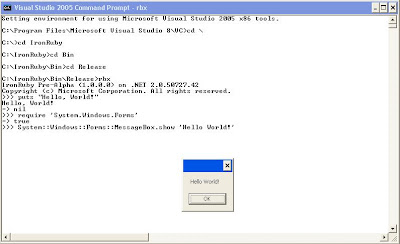
Build.cmd got this %frameworkdir%\%frameworkversion%\msbuild.exe /p:Configuration=Release /t:Rebuild IronRuby.sln
For some reason I don't have frameworkdir and frameworkversion environment variables set.
I just used
msbuild.exe /p:Configuration=Release /t:Rebuild IronRuby.sln.
I will mention my environment in a bit detail. Go through this if you got similar errors, else skip this part.

I don't have Visual Studio 2005 installed on my
OS Name: Microsoft(R) Windows(R) Server 2003, Standard Edition
OS Version: 5.2.3790 Service Pack 1 Build 3790
I use web install of "Microsoft® Windows® Software Development Kit Update for Windows Vista™"
Here is the Build Log
--------------------------------------------------------------
Setting SDK environment relative to C:\Program Files\Microsoft SDKs\Windows\v6.0.Targeting Windows Server 2003 x86 DEBUG C:\Program Files\Microsoft SDKs\Windows\v6.0
C:\IronRuby$Build.cmd
C:\IronRuby$\\msbuild.exe /p:Configuration=Release /t:Rebuild IronRuby.sln
The filename, directory name, or volume label syntax is incorrect.
C:\IronRuby$msbuild.exe /p:Configuration=Release /t:Rebuild IronRuby.sln
Microsoft (R) Build Engine Version 2.0.50727.42[Microsoft .NET Framework, Version 2.0.50727.42]Copyright (C) Microsoft Corporation 2005. All rights reserved.
Build started 7/27/2007 5:06:24 PM
Project "C:\IronRuby\IronRuby.sln" (Rebuild target(s)):
Build succeeded.
0 Warning(s)
0 Error(s)
Time Elapsed 00:00:06.79
Here are some sample tests with "Hello, World"
C:\IronRuby$

Windows Command Prompt Customization
Now and then we happen to work on Windows Command Prompt. What makes me annoyed is its lengthy prompt. It becomes so irritating when you work deep inside hierarchy.
Here is an option to have path for ready reference as well as space to enter long commands.
To get this check for following registry settings
Windows Registry Editor Version 5.00
[HKEY_LOCAL_MACHINE\SOFTWARE\Microsoft\Command Processor]
"AutoRun"="prompt $P$_$$"
"CompletionChar"=dword:00000040
"DefaultColor"=dword:00000000
"EnableExtensions"=dword:00000001
"PathCompletionChar"=dword:00000009
Here I added registry settings for path completion too.
Also I customized my title, you can see that in pic.TOP TEN TIPS TO STAND OUT FROM THE CROWD
This is from author of Beyond Code, Rajesh Shetty.
I attended his session sometime back. Here is the link for these points.
1. //Focus on ROII.(Return on Investment for an Interaction)
Time is precious for everyone. Ensure that you provide the highest value for anyone investing time in an interaction with you.
2. //Keep the promises you make to yourself.
Making promises to yourself is easy. Keeping them is very hard!
3. //Set right expectations
The first step in trying to exceed the expectations is to set them right in the first place.
4. //Set higher standards
Raise your standards higher than the general norm and watch miracles unfold!
5. //Avoid complacency at all costs!
There is nothing like maintaining the status quo. You are either falling or rising.
6. //Commodotize your work at regular intervals
You don't have to wait for someone else to commodotize your work.
7. //balance home runs with small wins
Home runs are great. But small wins are important too!
8. //Think!
Set aside time to "Think." Most often thinking is done in parallel to other activities.
9. //Never take people for granted
Would it be any fun if someone took you for granted?
10. //Ask the right questions
Answers help. But, it's not always the answers that matter.
Thursday, July 26, 2007
Stable Development Environment till Visual Studio 2008.
Visual Studio 2005 extensions for .NET Framework 3.0 (WCF & WPF), November 2006 CTP
IIS 5.1 / 6.0 on Windows XP / Windows Server 2003
Wednesday, July 25, 2007
Collections Best Practices
This is referenced form an article in August issue of CLR Inside Out. Link
The basic purpose of collections is to tie certain objects together as a group because they have some logical connection to each other.
General criteria to select a particular collection object goes like this
- Are you going to be adding all the elements at once?
- Are you going to be dynamically adding and removing elements?
- Do you only need to iterate over the entire collection, or do you also need to locate and use specific elements?
- Are you exposing your collection through a public API?
- What are the performance characteristics and requirements of your application?
If you’re using the .NET Framework 2.0 or later, using the old non-generic collections is strongly discouraged. Following table shows the mapping between
.NET 1.0 Collection classes and .NET 2.0 Generic collection classes
| Non-Generic | Generic Replacement |
|---|---|
| ArrayList | List<T> |
| BitArray | No replacement exists |
| CollectionBase | Collection<T> |
| Comparer | Comparer<T> |
| CompatibleComparer | Comparer<T> |
| DictionaryBase | KeyedCollection<TKey,TItem> |
| Hashtable | Dictionary<TKey,TValue> |
| ICollection | ICollection<T> |
| IDictionary | IDictionary<TKey,TValue> |
| IList | IList<T> |
| Queue | Queue<T> |
| ReadOnlyCollectionBase | ReadOnlyCollection<T> |
| SortedList | SortedList<TKey, TValue> |
| Stack | Stack<T> |
Pros and Cons of each type:
Dictionary
When you want additions(fast), removals(fast), and lookups(average) to be very quick, and when you are not concerned about the order of the items in the collections, your first inclination should be to use a System.Collections.Generic.Dictionary<TKey, TValue>.
List
If your usage pattern requires few deletions and mostly additions, and if it is important for you to keep the collection in order, you may want to choose a List<T>. If you do not care about sorting or inserting items in the middle, nor do you care about looking up individual items in the list but want to iterate over complete list.
Queue
to implement a first-in-first-out (FIFO) order
Stack
to implement a last-in-first-out (LIFO) order
LinkedList
when you need to maintain order yet still achieve fast inserts. But increases increased activity by the garbage collector. While the actual act of inserting an item into a LinkedList<T> is much faster than doing so into a List<T>, finding the particular location at which you want to insert a new value still requires traversing the list to find the correct location.
SortedDictionary
uses a balanced tree implementation as the underlying data store; this provides relatively fast lookups and maintains items in a sorted order, but insertions will most likely be slower.
SortedList
which uses two separate arrays to maintain the keys and the values separately and to maintain them both in order
Extending Collections
The System.Collections.ObjectModel.Collection<T> class implements all of the standard collection interfaces, and your custom collection type can simply derive from Collection<Double> in order to provide the additional overload methods. You could also use extension methods in C# 3.0 to achieve the same.
Gist on Collection Interfaces
IEnumerable
methods:
GetEnumerator - returns IEnumerator
IEnumerator
methods:
Reset
Current
MoveNext
ICollection - extends IEnumerable
methods:
Add
Remove
Clear
Contains
CopyTo - copies items to an array
properties:
Count - Readonly count
IsReadOnly - items cannot be removed or added
(mutable items can be modified even if the collection is read-only).
IList - extends ICollection
methods:
IndexOf
Insert
RemoveAt
indexer: allows to get and set any item in the collection, just as you can when using arrays
IDictionary - extends ICollection
methods:
Add - overload that associates a key with the item that is added
ContainsKey - method will check for the existence of a particular key
Properties:
Keys - returns an ICollection of all the keys
Values - returns an ICollection of all the values
remove - overload based on the key instead of the value
indexer: using the key.
Subscribe to:
Posts (Atom)