Thursday, December 13, 2012

printf instead of echo-e

It is a common need to echo content to files in scripts. But it could turn out a bit tricky to handle escape sequences like new line.

echo is provided as part of binutils but shell can provide its own too. Default handling of escape sequence varies from shell to shell. In case of Ubuntu default shell is dash(debian shell). It handles escape sequences by default. Thus sh -c "echo -e 'foo\nbar'" could end up as "-e foo\nbar" instead of foo followed bar in new line.

But printf is more portable and reliable than echo-e. Something with print is

sh -c 'printf "%b\n%b\n" "for" "bar"'

This yields consistent and more reliable results across mostly used shell variants.

Sunday, November 18, 2012

Windows 8 on Desktop - Review 1

This week end I could upgrade my desktop with Windows 8 released version.
There are mixed feelings about it. Thought of sharing my experience and opinions.

Installation

After it booted from DVD, there is some violet screen without any picture or text for a while. I thought it is hung but that is OK, it is just drive spinning too hard. I installed on an old 2006 desktop with ASUS P5B Deluxe WIFI AP with 2 GB DDR2 RAM. It detected most of the drivers except ATI Radeon video controller and Realtek RTL 8187 WIFI adapter. But after connecting network cable it could download appropriate driver for WIFI. 

It couldn't pickup time from internet. I had to set it manually.

It didn't ask for key during installation. Also it failed to update key from system settings. I had to manually set from command prompt using slui.exe 3.

Otherwise installation is quick and simple. I would say MS engineers did fairly good job here.

Login Screen

When there are more users instead of adding rows, it expects user to scroll right. In this case expecting user to do horizontal scrolling is meaning less. This should be scrolling vertical.

Start screen

This is the view user gets to see after logging in.
Tiles
  • Live tiles are good.
  • Right click options(live off, big/small, uninstall) are handy.
  • Manual arrangement is not so naturally predictive. it needs some used to for users and some improvements from MS
Navigation
  • Left Top thumbs down, so confusing
    Irrespective of what app user is viewing, it shows preview of first app out of those running. It doesn't show preview of desktop apps like cmd (However Alt+Tab works). Only when user moves cursor down from top left it shows all apps. I don't know it is a bug or intended design.
  • Left Bottom OK
    It is a quick way to navigate between start menu and last accessed app.
  • Left Bottom(Right mouse) Good
    It is a quick launch for professional users. But there should be an option to add items to it. And styling of this menu can greatly improve.
  • Right Bottom Placing mouse at right bottom for menu is not so obvious but not so difficult to get used to. It is good that it changes background colour once menu is shown. But there is absolutely no need for date, time and network connection status here. It is so out of context here. Also options inside this menu are so discrete.
    • Search - thumbs up, well done
      It gets context of active app by default though user can change it. List of apps is a bit confusing at first glance but now I am OK with that. Clicking on an app need not launch it as the intention here is to search not to launch it.
    • Share - May be useful for some apps. Kind of nice to have.
    • Start - So confusing. Difficult to get used to.
      When user is working on an app it opens start screen else last app. It doesn't serve context of any app. MS should consider to rework on this.
    • Devices - OK Basically for quick printing etc..
    • Settings - Interleaving app settings and pc settings is confusing. But it can be corrected by providing a more distinctive separation like heading or background colour.
  • Lack of close button thumbs down.
    Lack of close button is a major departure from natural experience of windows
    1. Mouse on left top shows mere last window preview
    2. And sliding down mouse form left top shows banner where all opened apps are listed
    3. Now user got to right click on preview apps to get to close option

Default Metro apps

System comes with decent set of apps.
Here is how they fare
  1. Bing - Not bad
  2. Camera - Not so impressive
  3. Finance - Good enough
  4. Games - OK
  5. Mail, Calendar, People and Messaging - Good
  6. Maps - Pretty good actually They are from Nokia. Far better than Apple maps and catching up towards Google maps.
  7. Music - Below expectation
  8. News - Good enough
  9. Photos - Fails to impress
  10. Reader - Neat and simple
  11. SkyDrive - OK
  12. Sport - Could be made a potential area for app developers if MS intends to do so
  13. Travel - Good one. Social media integration is desirable
  14. Video - Very primitive. Practically useless
  15. Weather - Impressive. Sourced from Weather Decision Technologies

Desktop apps and tasks

Mostly used default desktop apps compared with Win 7
  1. file explorer - Retained most of Win 7 features. Ribbon is OK. Otherwise nothing worth mentioning
  2. Notepad - Nothing changed
  3. cmd - Pathetic. MS can't build a decent terminal. Really a shame on their part.
  4. mspaint - Nothing changed
  5. snipper tool - Nothing changed
  6. compress & extract - Nothing changed
  7. calculator - Nothing changed
  8. task manager - Worthy improvements. It is better and useful
  9. control panel - Retailed most of Win 7 features
  10. Internet Explorer - Disappointing.
    It has two modes. Metro mode and Desktop mode. Metro mode worked for few hours after installation. After that it always opened in desktop mode. I am not going to inner details like HTML5 etc. but as a user I will continue to use chrome as my default browser.
Mostly used system options
  1. Printer/Scanner handling - Nothing changed. Installs if printer is connected during installation.
  2. User management - Nothing worthy changed
  3. Add/Remove programs - Nothing changed
  4. Screen resolution - Nothing changed
  5. Service start/stop - Nothing changed
  6. Device Management - Nothing changed
  7. Disk Management - Nothing changed
  8. Event Viewer - Nothing changed
  9. File system hierarchy - Nothing significant
  10. Turn on/off windows features - Nothing changed

Store

Store is most anticipated and a welcome change in Windows 8. Though there are many rough edges, I get a sense that it started scripting a success story. There are few (9372 as on this writing) apps now, but some of them surely proving a point; that a great deal of vacuum still exists in otherwise chocked app space. Store can fill it with worthy apps and also attract substantial user base considering volume of current desktop users. But it is obvious that desktop can not contribute to progressive revenue growth in coming years. This is a unique challenge for MS. But, fingers crossed, I feel there isn't any magic wand that MS can shake to sustain deceleration of those desktop numbers in coming quarters. However if MS can offer unparalleled web service offerings to those desktop customers, then it can restrict them from drifting away for other tablet options. In my opinion, "Store" got ultimate mandate to achieve this intricate task.

With that background, I looked at Store as an app rather than content(apps) in store. I felt it is way behind expected overall experience.

Store app
  1. Navigation is not so impressive. A single row with long scroll is mediocre. It doesn't sense height of screen and build up visual experience when it is showing all categories. However once can click on a category to get zoom up view of all categories.
  2. It lacks multi/cross dimensional navigation and thus fails to offer experience-based choice.
  3. That minus at right bottom corner is rather absurd.
  4. It isn't very obvious that category header is actually a link.
  5. Apart from 'Top Free' and 'New Releases' I expected 'Top Rated' there. It is however available inside each category.
  6. Navigation through Sub-categories(where available) is not so intuitive with that lengthy combo box.
  7. It is not so obvious that apps can be searched as there isn't any box to type text. Users need to hover mouse at right bottom corner to get main menu and user search option there.
  8. It shows prices in local currency which is commendable.
  9. There is no way to uninstall an app from app store
  10. There is no way to launch an app while viewing at details of app.
  11. It is not so obvious that user need to click on right mouse and select "Your apps" to get to see installed apps. But it is not difficult to get used to this.
  12. There is no to clear uninstalled apps. Thus when user installs an app and feels that it isn't so impressive and uninstalls, it still remains in your apps list. There is no way to clear it. And clear button in Your apps doesn't serve any meaning full purpose except to deselect.
  13. Combo box in Your apps section is buggy. "Apps installed on xxx" shows apps not installed also.
  14. Experience of paying for an app is OK. And user can change a setting to always ask for password when buying an app. I couldn't find any option for redemption.
  15. It is not necessary to add payment information to use free apps.
Store Categories(as on this writing)
Games (1401), Social (198), Entertainment (1219), Photo (228) Music & Video (332), Sport (303), Book & Reference (655), News & Weather (272), Health & Fitness (339), Food & Dining (292), Lifestyle (370), Shopping (57), Travel (373), Finance (98), Productivity (511), Tools (853), Security (65), Business (142), Education (1633), Government (31)

Performance

I wrote all this using "Markpad" markdown app in Store. I spent around 4 hours. And machine crashed and forcibly restarted three times while writing this article with error IRQL_NOT_LESS_OR_EQUAL. That indicates a issue with a driver, I suspect it to be ATI Radeon ATI. Otherwise boot up is pretty fast. I just got basic OS and VS2012. I am yet to have a check on VS2012 on Windows 8.

Sunday, May 27, 2012

Global Keyboard shortcut to launch terminal in Mac OS X

I had to restore my Mac as it screwed up while upgrading to OS X 10.7.4. After restoring from scratch I had to setup few common things like global short cut for terminal.

I followed this http://forums.macrumors.com/showthread.php?t=171464

For quick reference here are the steps.

1. Launch Automator from the Applications folder

2. Choose Service

3. The line that states "Service receives selected" change it to "no input"

4. From the Action side drag to the workflow side "Launch Application"

5. For the pull down in the Launch Application action select the application you would like to launch. For Terminal you will have to go to the bottom and select "Other" and find it in the Utilities folder.

6. Save the Service giving it a unique name like Launch Terminal

7. Goto Keyboard Shortcuts tab within the Keyboard System Preferences

8. Select Services from the left pane and scroll down to General in the right pane. You should see your Service.

9. It's not so obvious, but double click to right side of your Services row. This allows you to enter a key combination for the shortcut. 

10. Enter a key combination and close System Preferences.


*Note*    

1. As this shortcut is for all applications. Atleast one application should be running for keyboard shortcut to take effect. May be Finder. So if you just login, the short cut may not work straightaway. Start atleast one app then you are ready to go.

2. Also if custome profile is created for terminal, make sure to make it startup (First Tab)

Wednesday, December 28, 2011

adopting sass with Sinatra

I have been working on an embedded web application with Sinatra. I took enough care to keep css files clean and compact. But it is getting tougher with ever growing style sheets to be vigilant at all times. I heard about sass and less but never felt I would need such tools to handle styles. Today I could learn basics of Saas.
And now I regret for not adopting to such good frameworks from the beginning.

Though less offers dynamic stylesheets, 32kb javascript is too much of a burden for my embedded application.
As such I run a rake script to minify and compress markup and javascripts. I thought sass would be a better choice. I could simply run script to convert scss files to css.

But it would not be so much so convenient during development to convert these scss files every now and then to css. But thanks to Rack and Sinatra it was really easy to integrate sass with existing app.  Here goes sinatra file.


require 'sinatra'
require 'sass'

get '/stylesheets/:name.css' do
  content_type 'text/css', :charset => 'utf-8'
  filename = "#{params[:name]}"
  render :scss, filename.to_sym, :layout => false, :views => './public/stylesheets'
end

get '/' do
  erb :index
end


 Normally we don't need to write a get routine for resources in public folder. But in this case sass looks at "views" folder for scss files. Also during development it would be better if we could test actual css. Thus converting these scss files to css makes more sense. Now I can keep styles in more modular way using nice features of saas. Following two underscore files makes them modular as saas wont generate css for them
when they are imported.

_s1.scss

#fullname {
  p:first-child {
    color : grey;
  }

  p:last-child {
    color : lightgrey;
  }
}

_s2.scss

#communication {
  p:first-child {
    color : red;
  }

  p:last-child {
    color : lightgrey;
  }
}

also theme.scss can be made with functions and using mixins

theme.scss
@function  contact_padding($n) {
  @return ($n * 3) + px;
}


@mixin contact($bw, $bc) {
  padding:contact_padding($bw);
  border: $bw+px solid $bc;
  font-size:20px;
  font-weight:bold;
}

Now all these are imported to common.scss as

common.scss
@import "s1", "s2", "theme";

.theme1 {
  @include contact(2,orange);
}

Now when common.css is linked in html, sinatra does all hard work of importing and converting  before rendering css files.


<!DOCTYPE HTML>
<html>
  <head>
    <link rel="stylesheet" type="text/css" href="stylesheets/common.css" />    
  </head>
  <body>
    <div class="theme1">
      <div id="fullname">
        <p>Sriharsha</p>
        <p>Vardhan</p>
      </div>
      <div id="communication">
        <p>Email: mail@mydomain.net</p>
        <p>Mobile: +91 0101 010 101</p>
      </div>
    </div>
  </body>
</html>
Hope this makes it easy to get started.

Monday, December 26, 2011

HTML5 arrows

I am trying to create bar graphs with html5. As part of that I needed forward and backward arrows.

I tried to get arrows marked out of html and css3. Here is the result http://jsfiddle.net/harsha/2aq7R/1/embedded/result


Just started with arrow head. This wont show up anything as border is transparent is all sides.

      .arrow_head {
        width: 0px; border-width: 20px; border-style: solid;  
        border-color: transparent transparent transparent transparent;
      }

Now to get top arrow effect let us show up bottom border.
      .top_arrow {
        border-bottom-color: #E9E9E9;
      }


Similarly to get down arrow let us open up top border
      .down_arrow {
        border-top-color: #E9E9E9;
      }


to get right arrow let us open up left border
      .right_arrow {
        border-left-color: #E9E9E9;
      }

to get left arrow let us open up right border
      .left_arrow {
        border-right-color: #E9E9E9;
      }


Now arrow body is pure border with fixed height and width. so to get right arrow


      <div style="float:right">
        <div style="width:20px; height:20px; background:#E9E9E9; float:left; margin-top:10px">div>
        <div class="arrow_head right_arrow" style="float:left">div>
      div>


Similarly all sides can be offset as shown below


HTML>
<html>
  <body>
    <div style="background:gray; width:300px; padding: 10px; height:40px">

      <div style="float:left">
        <div class="arrow_head left_arrow">div>
        <div style="width:20px; height:20px; background:#E9E9E9; margin-left:40px; margin-top:-30px">div>
      div>

      <div style="float:right">
        <div style="width:20px; height:20px; background:#E9E9E9; float:left; margin-top:10px">div>
        <div class="arrow_head right_arrow" style="float:left">div>
      div>

    div>

    <br />
    <div style="background:gray; width:300px; padding: 10px; height:40px">

      <div style="float:left; margin-top:-20px">
        <div class="arrow_head top_arrow">div>
        <div style="width:20px; height:20px; background:#E9E9E9;  margin-left:10px">div>
      div>

      <div style="float:right">
        <div style="width:20px; height:20px; background:#E9E9E9; margin-left:10px">div>
        <div class="arrow_head down_arrow">div>
      div>

    div>


  body>
html>


And here is the css


      .arrow_head {
        width: 0px; border-width: 20px; border-style: solid;  
        border-color: transparent transparent transparent transparent;
      }
      .top_arrow {
        border-bottom-color: #E9E9E9;
      }
      .down_arrow {
        border-top-color: #E9E9E9;
      }
      .right_arrow {
        border-left-color: #E9E9E9;
      }
      .left_arrow {
        border-right-color: #E9E9E9;
      }


Tuesday, October 04, 2011

Uncrustify - Source Code Beautifier

Just came across a powerful tool for code beautification.

http://uncrustify.sourceforge.net/


Features

  • Ident code, aligning on parens, assignments, etc
  • Align on '=' and variable definitions
  • Align structure initializers
  • Align #define stuff
  • Align backslash-newline stuff
  • Reformat comments (a little bit)
  • Fix inter-character spacing
  • Add or remove parens on return statements
  • Add or remove braces on single-statement if/do/while/for statements
  • Supports embedded SQL 'EXEC SQL' stuff
  • Highly configurable - 400 configurable options as of version 0.58

Friday, September 30, 2011

gitignore skipping folder hierarchy

I was just trying to setup a new git repository for existing code base. Tree is something like this (names changed but structure retained)

├───apps
│   ├───bin
│   │   ├───x64
│   │   │   ├───Debug
│   │   │   └───Release
│   │   └───x86
│   │       ├───Debug
│   │       └───Release
│   └───libs
│       ├───Debug
│       └───Release
└───libs

.gitignore

Now my intention is to setup .gitignore file with following assumptions
1) libs at root and files below should be ignored
2) libs below apps and all files below should be considered for tracking
3) Debug and Release folders under apps\bin\x86|x64 should be ignored
4) Debug and Release folders under apps\libs should be considered for tracking

Help file of git ignore doesn't provide much help about placeholders and skip tokens. Though I wish a regex option could be ideal. After some hit and trial I could come up with following .gitignore file

/libs
*/bin/*/Debug
*/bin/*/Release

With this when I add and check for status I get desired result.


$git add .

$git status
# On branch master
#
# Initial commit
#
# Changes to be committed:
#   (use "git rm --cached ..." to unstage)
#
#       new file:   .gitignore
#       new file:   apps/apps1.txt
#       new file:   apps/libs/Debug/appslibsdebug.txt
#       new file:   apps/libs/Release/appslibsrelease.txt
#       new file:   apps/libs/appslibs1.txt
#


Monday, August 29, 2011

Systemic disorders and juvenile instincts

As I am going through different content being published about Anna's movement, I am observing a peculiar attitude with highly informed and networked groups of people. Lack of moderation on social media in developing countries like india is instilling systemic disorder and juvenile delinquency in these groups.

Though number of people involved in these groups my not be so high, intensity of this disorder could be quite alarming. These groups got exuberant communication skills but due to juvenile instincts they get latched onto unavailing discussions. They get so much so involved with their incessant discussions they actually fall into the trap of  becoming perverse.  Now when you bring them to a table together with others they start feeling themselves as aliens. As I said, numbers may not be so high but the intensity is quite alarming. 

These groups attract teenagers instantly as everything revolves around bashing something that is popular so as to reward themselves as smarter than popular ones.  Actually they get caught in that illusion. But the amount of time they spend and the intensity with which they dissolve themselves in those illusions leads to dangerous systemic disorder. Now I suspect, what we are observing in UK today could be traced back to some sort of disorder of this nature. Repercussions could be completely different but the extent of ability to create harm could be same. Of course I am not a qualified psycho analyst or a seasoned speaker on the subject but I am sensing along these lines. Really hoping for some competent authority to study on this aspect and disprove me. 

Saturday, August 27, 2011

Is ballot process immutable?

Those who agitate against a misconducting priest are not against GOD. Indian constitution is devine, no one is objecting it's greatness. But what to do when priest is misconducting? Unfortunately constitution with its divinity and parliament as sacred legislative house cannot themselves offer governance to any society. There got be a functional government made up of competent people, capable of being representative as well as authoritative to uphold traditions of a particular parliamentary system. 

And the process of selecting such competent people is crucial to make this system work for any society. Such process can't be mere a competency assessment test or proportional representation. First of all this got to be peaceful and then workable, innovative and above of all mutable. Democracy suggests majority vote as one of the mechanisms through which this process can be exercised peacefully. Founding fathers of our nation suggested a workable solution in the form of a ballot which in fact was a popular form of practice prevailed at that time. And in last 60+ years the only improvement we could do is to convert a paper ballet to an electronic one. But we somehow caught in an impression that this process is immutable. Voting system can't be the only possible solution for this process.

Current day advances in network technology can offer more practical solutions for this problem. And the scope of the solution need not limit to electing but could also include selecting the candidates for election. And how can we make selection of a candidate a continuous process and election a periodic process say once in every 5 years?

Wednesday, August 24, 2011

Where were these maestros?

Now a days I am getting to know about so many people who are suggesting far superior methods than what Anna is following to fight against corruption in this country.

I don't know that there are so many knowledgeable people in this country who can suggest about intelligent ways to fight against corruption.

But it is quite unfortunate that I could hear and rather know about them only when a 70+ year old man makes a so called dangerous move.

Yesterday, few fellow country men, under the influence of alcohol, came to Ramlila ground and tried to create ruckus. Police came and took them away. I have high respect for them because they had to consume alcohol to behave abnormally. As influence of alcohol lasts for only few hours. I have no concern getting along those fellow citizens as soon as they come out of that influence. 

But I am highly afraid about these intellectual maestros who don't need to consume anything to be abnormal. And there is no hope that they will ever come out of an influence which makes them feel that they can do better than anybody else in this country. Dear friends though I admire your courage and confidence towards that supremacy, I would humbly request you to take that first step towards making yourself acceptable by being dignified when presenting views about fellow countrymen who are also trying to do good for this country at their capacity. May be the methods may not sound reasonable to you, but I hope there is no difference of opinion on objective. 

When you goto Palika bazar and ask for price of a picture, seller may quote 2000. And you may negotiate for 300. Deal could satisfy either party. It happens indeed. What I meant to say is quoting 2000 may sound stupid, but as a seller he/she knows what makes a negotiator happy. When you deal with government you would indeed place riders which govt. want to negotiate so that the middle ground becomes reasonable for either party. Of course if you are a habituated buyer in showrooms you wouldn't have come across such experiences.

But is this the way we want our systems to be forever? Of course no, but let every fellow countrymen make some way ahead to their capacity.

Tuesday, August 23, 2011

Who owns civil society?

Don't know who owns civil society? Problem lies with media refering any group of civilians as civil society. Looks like media must draft a guideline on eligibility to mention any group as civil society by consulting experts like Aruna Roy, Arundhati Roy etc..

If thy are all fighting for better society, don't they have some diligence that soldiers follow. Fight headon with points of conflict on subject of discussion which in this case is a bill. Why make provocative statements about methods and modus operandi? Let people exercise their freedom and do what they deem appropriate for a situation as long as it is peaceful and non-violent.

It's completely inappropriate to label Anna's movement as a dangerous phenomenon breeding impatience in the youth of this country. Anyway no need to substantiate that, as readers can distinguish it obviously.

Now I don't know if I would get classified as mass, though I have no concern over it, if I say that I don't mind supporting any cause that makes this country better including Anna's movement. Tomorrow if anyone else asks me to support their form of fight, either in the form of a movement or discussion or whatever that could be, I would support it if I see a clear benefit for this country. For that matter I would do so for every other cause to the extent feasible for me.

Everyone got their freedom of speech, but as a soldier fight with spirit against enemy, which in this case is corruption, rather than a tool and method used by other soldiers. Everyone cannot afford sophisticated ammunition, but if a latti is handy, what is wrong if anyone chooses to defend the community using a latti? Do you say they are not defending community and they can not claim themselves as community?

Saturday, August 06, 2011

Checking for integer ranges - C# to C

I had tough time explaining what should be the correct mechanism for checking integer range for a developer coming from C# to C.

Intention is to check a value within the range of 0 to 4. Anything less than 0 and above four is invalid.

Expression written is

((http_method > -1) && (http_method < 5))

I wrote a review comment to change expression as

(Method >= 0) && (Method <= 4))

Comment is not accepted and led to a discussion, rather argument.

I said I have a problem with first part of expression

(http_method > -1)

The '-1' could be tricky depending upon type of http_method.

And in this case http_method is unsigned int and returned false even for correct range.

It took a while to explain the expression is invalid.

Though C# has an 'uint' type, an 'int' would suffice the need in most of the scenarios.

So using correct data type is one part of it. Also when it comes to checking ranges it is always recommended to check inclusive ranges rather than outer ranges. One simple reason for that is test cases. Test cases with inclusive range are considered as positive test cases and boundary range are considered as negative test cases.

Technically there is no binding to follow inclusive range check. But it is a good convention to follow.

Changing diff/merge tool

I have been using Winmerge for years. Never expected that I would find any limitation with it. But it is failing to show diff view of c file modification in git repository with tortoise front end.

Moving to DiffMerge from SourceGear.

Though licensing is not so encouraging, it is a proving to be a good choice.

Shell integration is neat. No noise in diff view. Advantage with reference view and edited view.

So far so good.

Friday, July 22, 2011

Devloping web2.0 user interface for self hosted WCF services using HTML5, CSS3 and JQuery

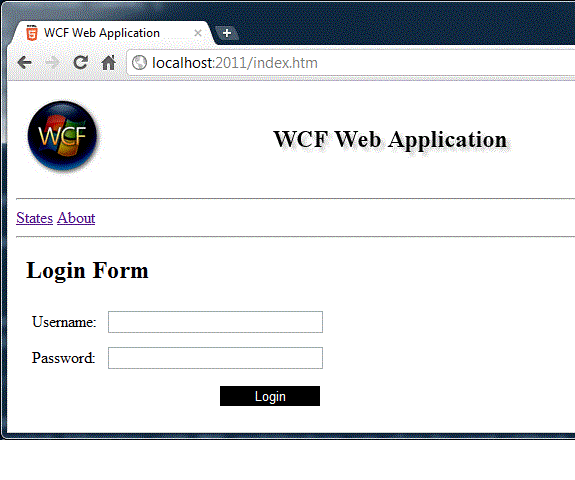
WCFWebApp Image - maximum width is 600 pixels


Link to article

Introduction


This article describes a method to utilize WCF self hosted services to be able to serve web 2.0 user interface as well as web services.

By using this method tools or applications can be built using web 2.0 technologies like HTML5, CSS3 with self hosted WCF service as backend business layer. Thus developers can benefit from advanced javascript libraries like JQuery or Underscore etc.. to build user interface. This eliminates need to install .Net framework on client machines.

Traditionally self hosted WCF services has user interface built using WinForms and WPF technologies. And to be able to use browser as UI platform ASP.Net and IIS becomes hard dependencies. For tools and applications which typically are executed out of a single machine or intranet with limited users, IIS is considered as an overkill. Thus browser as a UI plarform with HTML5, CSS3 and backed by powerful javascript engines is very promising option for self hosted WCF services.


Background


Intial versions of WCF could only work with SOAP messages. With bindings like WebHttpBinding from .Net3.5 onwards WCF could offer direct support to consume web services from ajax calls from javascript. However consuming dataformats like JSON is still not so much so an out of box experience. Effort to write DataContracts for every argument and return types is quite high. And with other data formats like XML, client end couldn't directly benefit from javascript libraries due to extra step involved to convert from XML to JSON.


This method considers 'Stream' as input and out type for UI interfacing operations. It also supports basic authentication which can be extented for advanced usage. And no customization is done at any layer and just works based on out of box features of WCF in .Net 3.5. This can also be used with .Net 4.0. However for JSON.Net is used to format json objects.


Using the code


Download and build source. You can use Visual Studio 2010 or VS command line. (Code is built for .Net 4.0 but can be used with .Net 3.5 also)

  1. Start WCFWebApp.exe. If port 2011 is not free, change to different port. And you need admin previleges
  2. When server is running, open any browser with javascript support and navigate to "http:/:/index.htm"
  3. Enter username # 'user' and password # 'pass' and click on login. You will login and an about page is loaded
  4. Click on States link
  5. Check on visited option for any state and click on Update
  6. Change page to About and come back to States and observe that last selection is perisisted.
  7. Click on 'Logout' on right top corner.

All these operations are run out of a self hosted WCF service. And this demonstrated features like authentication, fetching static files, getting as well as setting and data. Following sections walk through code.


Server code


Main class just starts a WCF service using WebHttpBinding and WebServiceHost.

class Program
  {
    static void Main(string[] args)
    {            
      string baseAddress = "http://" + Environment.MachineName + ":2011/";
      using (WebServiceHost host = new WebServiceHost(typeof(WebApp), new Uri(baseAddress)))
      {
        WebHttpBinding binding = new WebHttpBinding();
        host.AddServiceEndpoint(typeof(IWCFWebApp01), binding, "").Behaviors.Add(new WebHttpBehavior());
        host.Open();
        ... other lines left for brevity
      }
    }
  }

Service contract defines a method 'Files' to serve all static html files, another method 'Links' serves all linked files like javascript, stylesheets and data. Other resources like login. logout, States and State are service operations. Observable point here is 'Stream' data type for input as well as output.

[ServiceContract]
    public interface IWCFWebApp01
    {
      [OperationContract, WebGet(UriTemplate = "/{resource}.{extension}")]
        Stream Files(string resource, string extension);

      [OperationContract, WebGet(UriTemplate = "/{path}/{resource}.{extension}")]
        Stream Links(string path, string resource, string extension);

      [OperationContract, WebInvoke(Method = "POST", UriTemplate = "/login")]
        Stream Login(Stream request);

      [OperationContract, WebInvoke(Method = "POST", UriTemplate = "/logout")]
        Stream Logout(Stream request);

      [OperationContract, WebGet(UriTemplate = "/states")]
        Stream States();

      [OperationContract, WebInvoke(Method = "POST", UriTemplate = "/state")]
        Stream State(Stream request);
    }

Now coming to service implementation. As this method is primarily intented for self hoseted WCF services, singleton isntance with concurrent threads is good enough. Consider sessions as applicable. But unlike IIS hosted services, self hosted services would nomally serve limited users and thus default concurrency is good enough. And on functional line constructor is just loading data onto local member.

[ServiceBehavior(InstanceContextMode = InstanceContextMode.Single,ConcurrencyMode=ConcurrencyMode.Multiple)]
    public class WebApp : IWCFWebApp01
  {
    JObject states;

    public WebApp()
    {
      if (states==null)
        states = JObject.Parse(File.ReadAllText("web\\data\\states.json"));
    }

    ... other lines left for brevity

  }

Now that server is running, when user tries to access for the first time, several htm, css and javascript files are served.
These are handled by methods 'Files' and 'Links'. Links are files refered in index.htm in head section like JQuery. And in 'Files' method different types of files are picked up from seperate folders based on extension. Switch cases can be extended based types of files.

public Stream Links(string path, string resource, string extension)
    {
       ... other lines left for brevity
    }

    public Stream Files(string resource, string extension)
    {
      switch (extension)
      {
        case "htm":
           ... other lines left for brevity
        case "js":
           ... other lines left for brevity
      }
    }

When user makes a login request, basic authentication token is sent in standard header "Authorization".
That is validated in a seperate method 'Authenticate' described later. Also username is sent as JSON object in request stream which is parsed into JSON object using JSON.Net library. Logout method is similar to login

public Stream Login(Stream request)
    {
      if (!Authenticate()) return null;
         ... other lines left for brevity
      JObject o = JObject.Parse(data);
    }

When user clicks on 'States' request reaches following method.
As this resource doesn't have any extension, request will not go through 'Files' method. Here request is authenticated and data is sent from member variable.

public Stream States()
    {
      if (!Authenticate()) return null;

      WebOperationContext.Current.OutgoingResponse.ContentType = "application/json";
      return new MemoryStream(Encoding.ASCII.GetBytes(states.ToString()),false);
    }

When user does a modification and clicks on 'Update', following method would be invoked. This parses state id and update class member variable and returns updated list back to client.

public Stream State(Stream request)
    {
      ... other lines left for brevity
      JObject data = JObject.Parse(new string(buffer));
      int id = ((int)data["id"]) -1;
      states["states"][id]["visited"] = true;

      return States();
    }

Authentication. Methods which require authorization invokes following method.

public bool Authenticate()
    {
      string userName = "user";
      string password = "pass";

      string basicAuthCode = Convert.ToBase64String (Encoding.ASCII.GetBytes (string. Format ("{0}: {1}", userName, password)));
      string token = WebOperationContext.Current.IncomingRequest.Headers["Authorization"];
      if (token.Contains(basicAuthCode))
      {
        return true;
      }
      else
      {
        WebOperationContext.Current.OutgoingResponse.StatusCode = HttpStatusCode.Unauthorized;
        return false;
      }
    }


Client code


Client code is placed in seperate folder by name 'web'. At the root of this folder all static htm files are placed. And seperate sub-folders are included for images, javascript and stylesheets. These are refered from 'Files' method in server code based on extension.


Client follows Single Page Application design. Thus only 'index.htm' is a full html page. Other html files are filled into 'content' division using ajax calls as shown below for states

function StatesPage () {
  this.loadStatesPage = function (data) {
    content = undefined;
    $.each (data, function (index, value) {
      if (data[index]["id"]=="content") {
        content = data[index].innerHTML;
        $("#content")[0].innerHTML = content;
        $("#b_update")[0].onclick = updateStates;
        loadStatesTable();
      }
    });
    if (content == undefined) {alert("Failed to load page: Content missing"); return;} 
  }
      ... other lines left for brevity
}

Authentication: Client side authentication token is in login class. This token is added in header section in 'beforeSend' function of each call after login. Other code in client requires understanding abour Jquery, javascript and ajax concepts which is well explained on web.


Points of Interest


If windows authentication is required, service host can be customized

More structured javascript libraries with MVC architecture can also be used without making any change to server side code.

Consider using JQuery UI plugins for common look and feel

As UI is browser based, extending UI for handheld devices becomes quite easy.


Saturday, May 14, 2011

Off line access and chromebooks

Just curious to know, how to perceive on local storage and off line access of chrome books. Chrome is HTML 5 compliant and thus every site can leverage local storage, session storage and web SQL anyway. And I guess web SQL in chrome is nothing but a SQLITE instance. When all you can do is accessed through browser and each site having a site specific solution, is there still any need for disk storage on chrome books? If yes what could be that scenario?

Monday, May 09, 2011

Reusability and user experience

Reusability

Are you finding a phenomenon like use and throw with software applications?

Do you have anything about one time usability of applications? Often I get trickled about usability and reusability. An year back I was advised to emphasize more and more on usability and if at all I could build something reusable in it, it is just out of luck.

With rapid development frameworks and high fidelity needs designing anything for reuse is nothing but being stereotyped. There were times when reusability was discussed at every stage of development life cycle. Tools and technologies of those times asked for it. But we built runtime frameworks like Java, .Net etc. They are offering well tested reusable code for every possible computational need. Now what we are building is, nothing but application specific functional codebase. And there could only be a marginal scope  in it for reusable design. There is still scope but it is significantly low. That raises a question on what should be the strategy with respect to reusability in design. 

Another aspect is rapid prototyping,  dynamic languages, shorter delivery cycles, built-in user accepted mechanisms for application upgrades, well informed user, UX demanding networked systems. 

We are not building isolated apps like calculator and paint anymore. Even configuration, profiling and diagnostic tools are networked. 

And it is UX that matters at the end of the day. Now UX is a subject of taste for same need like hunger. It can't be same dish for breakfast, lunch and dinner. Then where is reusability in application development. Just like food need to be consumed while it remains fresh, app remains fresh for sometime only. 

With this background we need to adopt new strategies. It goes like software offers solutions for several problems surrounding human livelihood; but at the same it solves its own problems by looking at patterns of real world.

How does fabric design industry solve this problem. How does chefs solve and what entertainment industry does. And now the gadgets. 

Apps markets solved one side of this problem. Gone are the days where Microsoft builts one app to suit needs of whole world. Now there are several options for same need like calendar in markets. There is no one size fit for all. Yes there are some mostly downloaded apps. But there are several others too. Each one suits for someones taste. 

With markets gadget builders shielded themselves to great extent. Now they can concentrate on building just the platform. 

Now that leaves other side of the story up for discussion. What is in it for app developer with respect to reuasability.

1) Nurture multiple design options. Don't throw away anything just because it is not the best. More the time you spend time with need of the app the more you would meet expectations of broader userbase. 
Nurture multiple designs thinking that you are rich enough to build against each design. This is what fabric industry do.

Here you reuse understanding about characteristics of product for building against multiple designs rather reusing design.

2) Integrate services not userbase. Calendar app for world cup season is different from calendar app for competitive exams. Now you can build multiple views in same app. But building two distinct apps solves the problem in better way because the intended users are different even though program constructional aspects are same. Same story is told as book, documentary, movie etc..

3) Build reusable software just for multiple versions of same application than new application. Cost of building and maintaining reusable components is not economical anymore. As mentioned earlier there shouldn't be any hour spent specially to build a reusable component for next project. Moreover app development on different design is cheaper than maintenance. Most of the reusable stuff is used in enhancements than new development.  

4) Let users know the makers signature rather than technology. There is nothing called reusability of UX. It's called copyright violation. Tree controls are not looking like traditional tree controls, combo boxes are presented in so many ways where it's difficult to make it out as CB. So spend time to give facelist to your primitive controls for application specific look and feel. Your app should look like what it is meant for rather than Java app or winforms or wpf or PHP. You are not selling app to procurement manager or dealer. So there no one to  market your app. It should market for itself.

Sunday, November 14, 2010

Windows live services

eeks

this is how skydrive partal shows up this morning. Windows live gone
for a toss today.

Tuesday, June 15, 2010

Back to blog

Breaking silence. As new means of sharing information like twitter, wave, buzz etc.. came out I thought blog is kind of out dated platform. But I am not finding them as a perfect alternative thus thought of resuming blogging again.

Sunday, January 03, 2010

Happy New Year 2010

 Wish you and your family a very Happy, Prosperous and Cheerful Newyear 2010.